
Formatted The Wrong Drive?
Bring Your Files Back Up.
Salvage reads formatted, corrupted and failing USB drives, SD cards and external hard drives without changing them, and rebuilds your photos, videos and documents with their original names.
Free Quick Scan with no data limit. Paid plans from $4.99, paid with USDT.
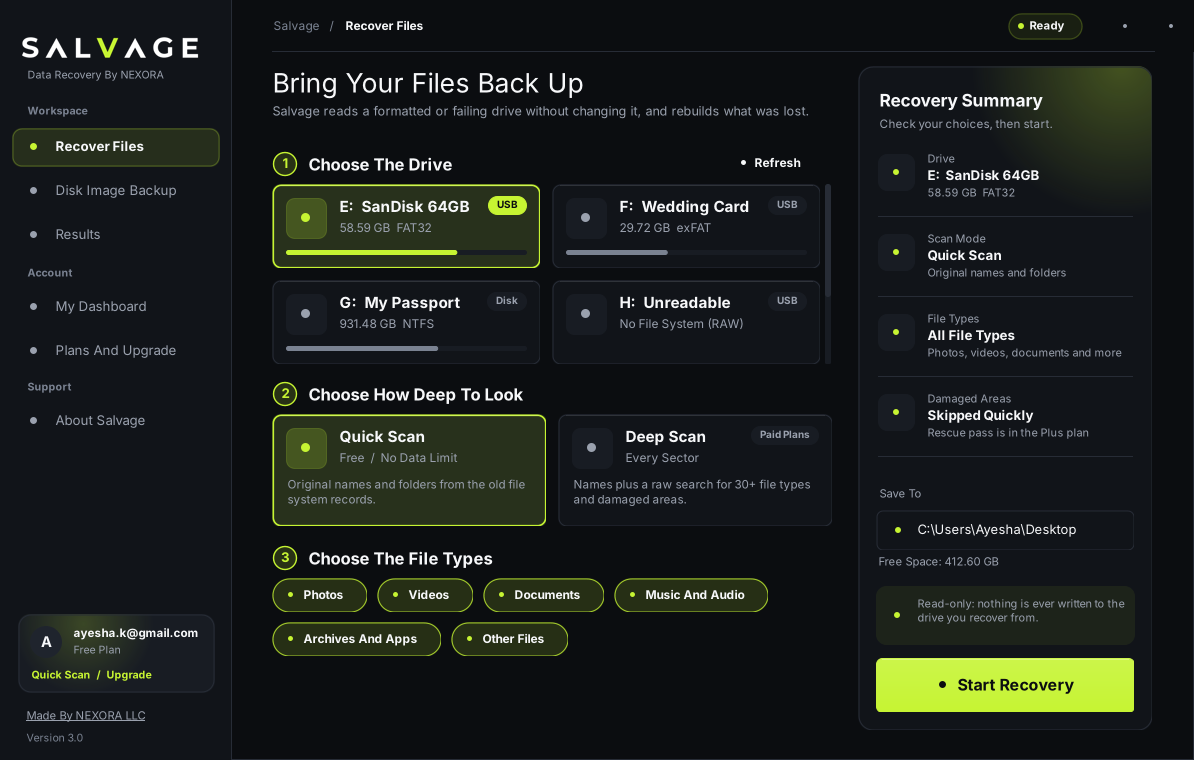
Three Steps, One Click
Plug in the drive, choose what to look for, and Salvage does the rest while you watch a live map of the whole drive.
Choose The Drive
USB, SD card, external hard drive or a disk image file. Do not copy anything new onto it.
Choose How Deep
Quick Scan restores original names and folders. Deep Scan also searches every sector for 30+ file types.
Save To Another Drive
Files are saved to the folder you choose, with a report of everything that was found.
Built For Drives That Fight Back
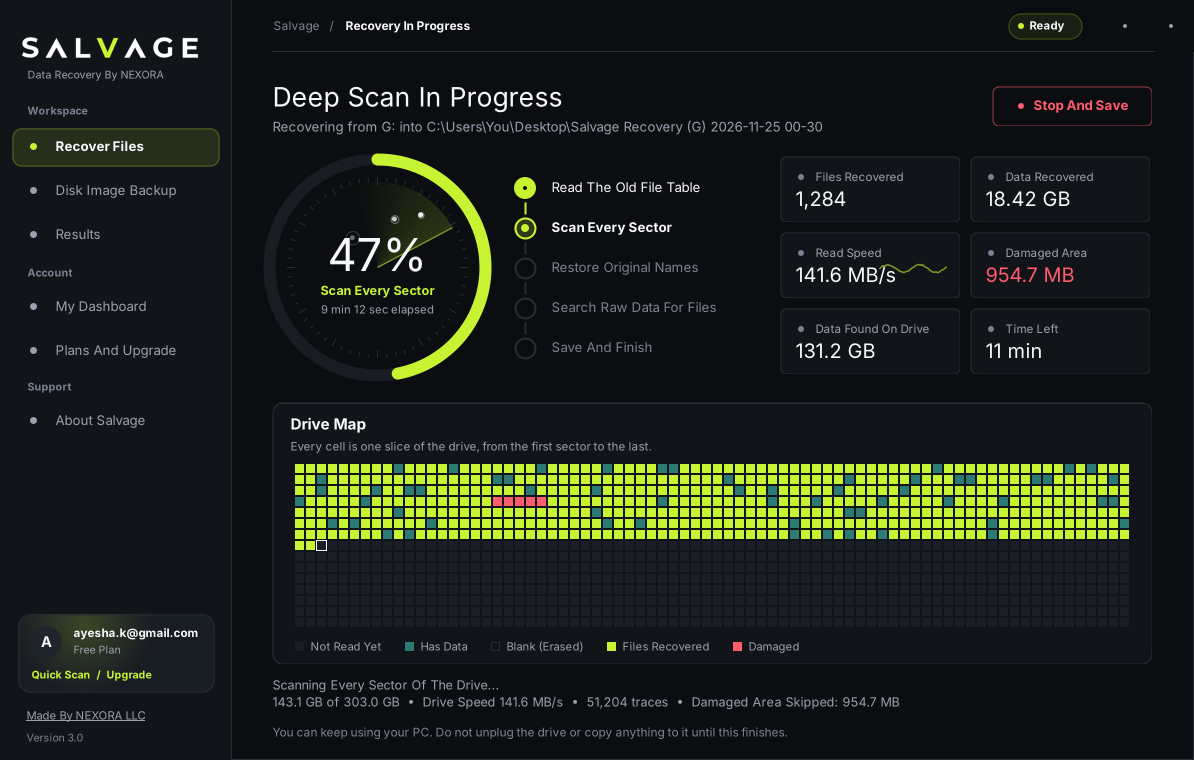
A failing disk with bad sectors stalls most tools for hours. Salvage skips damaged areas, reads the healthy parts at full speed, then goes back to rescue what it can.
Original Names And Folders
Rebuilds old NTFS, FAT32 and exFAT records, even when the new format has partly overwritten them.
Live Drive Map
Every cell is a slice of the drive: healthy, recovered, blank or damaged, updated as the scan runs.
Deep Scan
Searches raw data for photos, videos, music, documents and archives when the old records are gone.
Disk Image Backup
Copies a failing drive into one file on your PC, so every later scan reads the copy, not the dying disk.
Damaged Drive Rescue
After the main pass, Salvage returns to bad areas, trims their edges and splits them into small blocks.
Stop And Save Anytime
Stopping early still saves everything found so far, with a plain-language recovery report.
See It Work
A calm, simple app on the outside. A serious recovery engine underneath.
Simple Pricing. Serious Recovery.
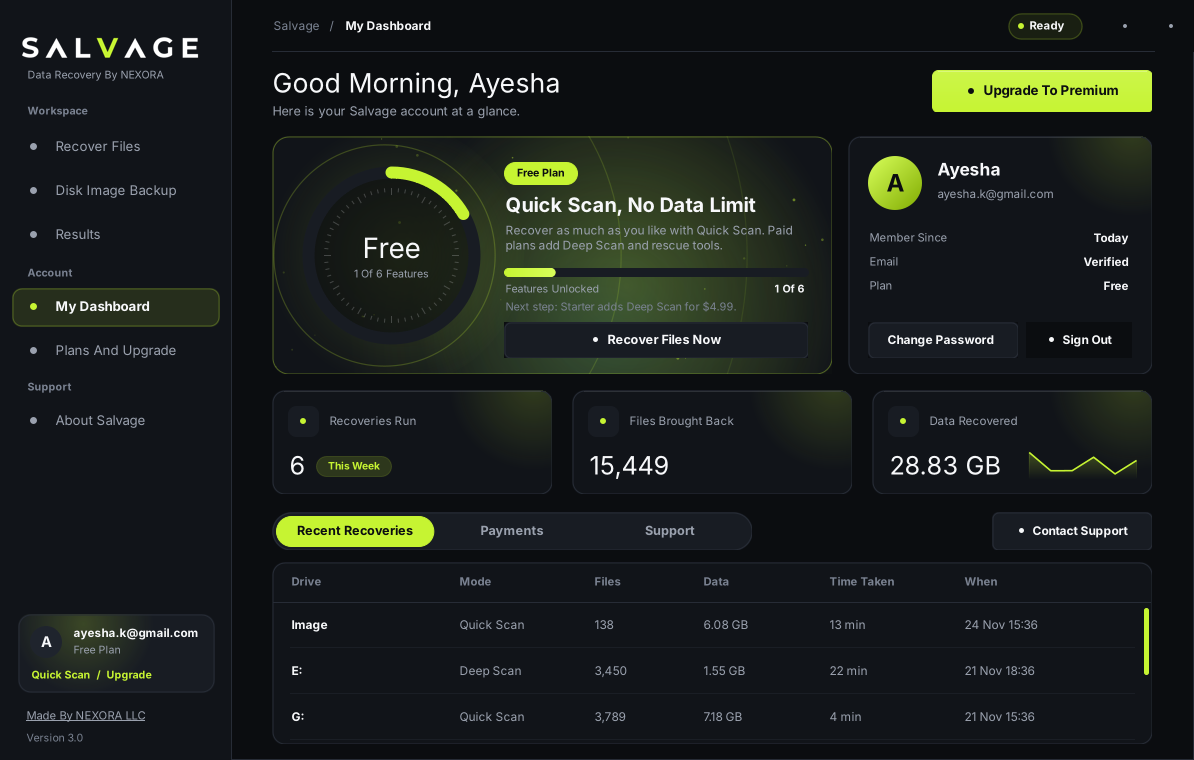
Every plan scans the whole drive with no data limit. Paid plans unlock deeper search and rescue tools.
Starter
1 Month- Deep Scan, 30+ File Types
- Photo And Video Search
- Recover From Disk Images
- No Data Limit
- Email Support
Plus
3 Months- Everything In Starter
- Disk Image Backup
- Damaged Drive Rescue
- 15 Min Rescue Pass
- Faster Support
Pro
1 Year- Everything In Plus
- Extended 30 Min Rescue
- Priority Support
- Every Update For A Year
- Use On Any PC
Ultimate
Lifetime- Every Pro Feature
- No Renewals, Ever
- All Future Versions
- VIP Support
- Best For Studios
After paying, open Salvage > Plans And Upgrade, paste your Payment ID and press Send For Activation. Other leading recovery apps charge $60 to $150 a year.
Download SALVAGE
Windows 10 and Windows 11. Free to download, free to scan.
Microsoft Store
The easiest and safest way: installs in one click, signed by Microsoft, with automatic updates.
Microsoft Store Listing Coming SoonDirect Download
- Download the installer below.
- If Windows shows "Windows protected your PC", click More Info, then Run Anyway.
- Follow the setup, then sign in or create a free account.
Also On: Gumroad · Peerlist · Recovery Guide On DEV
Questions, Answered
Can Salvage recover files after a format?
Yes, after a quick format. The old file records usually survive, so Quick Scan brings files back with their names and folders. After a full format, or on SSDs and some flash drives that erase themselves, the data is wiped and no software can recover it. Salvage tells you plainly when a drive reads back as blank.
Is it safe for my drive?
Salvage only reads the drive you recover from. It never writes to it. Always save recovered files to a different drive.
What does the free plan include?
Quick Scan with original names and folders, the live drive map and the recovery report, with no limit on how much you recover. Deep Scan, Disk Image Backup and damaged drive rescue are in paid plans.
How do I pay?
Plans are paid in USDT through NOWPayments. After paying, paste the Payment ID in Salvage under Plans And Upgrade. Your plan is switched on as soon as the payment is confirmed.
Why does Windows ask for permission?
Reading a drive sector by sector needs administrator rights. Salvage asks once when it starts.
Can I get a refund?
Yes, within 7 days if Salvage could not recover your files. See the Refund Policy.